2014年8月24日日曜日

葡萄&みかんの果物倶楽部〜Fruits Jelly


お中元で「果物倶楽部」をいただきました。

 コチラは、デラウウェアのゼリーです。

干しぶどうをゼリーにすると新たな美味しさを感じます。

 コチラは、みかんのゼリーです。
非常にシンプルなフルーツゼリーですが、素材のよさがそのまま生かされ、自然の甘みが美味しかったです。

2014年8月23日土曜日

ア・ラ・シュークリーム@Cafe Giglio


散歩中に素敵な館「カフェ・ジリオ」を発見したので立ち寄ってみました。


店内はお洒落なJazzが流れ、珈琲は自家焙煎という大人のためのカフェです。


スイーツは持ち帰り販売もしているので、試しにシュークリームを購入してみました。


外側のシューは、カリカリッとしており、チョコチップと粉砂糖がまぶされてます。
中のクリームはタップリと入って濃厚なお味でした。

また立ち寄ってみたくなる素敵な空間でした。

2014年8月22日金曜日

"Photo Sphere" by Google 〜 360度のストリートビュー


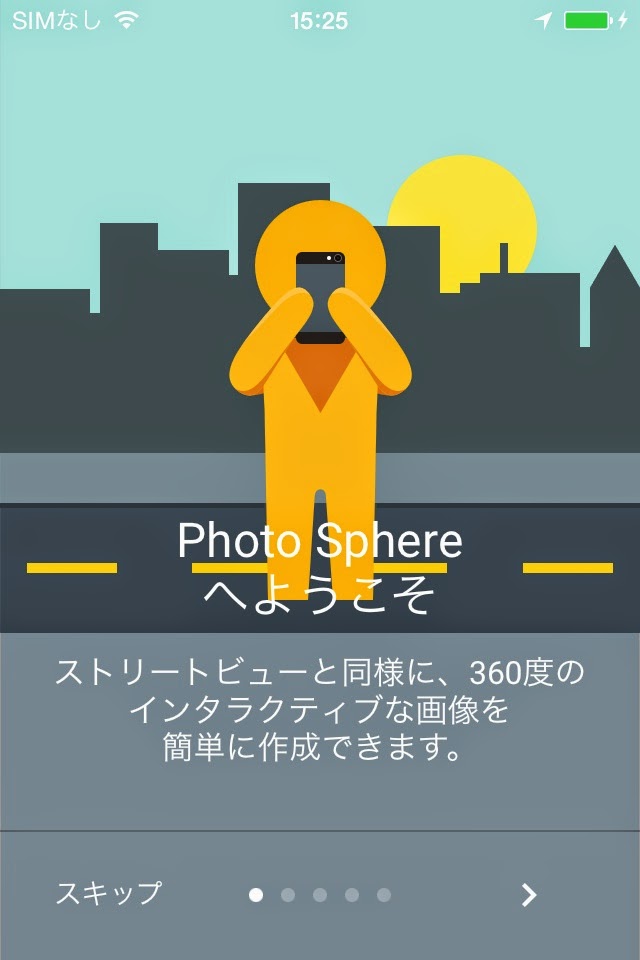
 Googleが360度のストリートビュー用のiPhone用Appを作成したというのでインストールしてみました。

アプリにこのようにチュートリアルがあります。

この通りに撮影すれば簡単に360度のストリートビューが撮影できてしまいました。

撮影した画像はGoogleMapに追加できます。

撮影はアプリの右下のカメラ・ボタンをタップして開始します。

コチラが今回テスト撮影してみた映像です。
iPhoneのアプリ上で動かすと、ストリートビューと同じようにニュルニュル動きます。

2014年8月20日水曜日

博多・長浜ラーメン@福岡空港


先日、福岡に出張した際に、空港で長浜ラーメンを購入してみました。


自分で、茹で卵、ソーセージ、もやしなどの具を調理して一緒にいただきました。


濃厚な味なのかと思いきや、以外にあっさりしたお味でした。


”OK,Google"が超便利!!〜Google Now ランチャー(Launcher)


 スマホに触らずに音声検索できる、"OK, Google" の機能を使うために「Google Now ランチャー」をインストールしてみました。
(I tried to install the "Google Now the launcher" in order to use you can voice search, the function "OK, Google".)
 「設定」で「Google Now ランチャー」をデフォルト画面にもできるようですが、個人的にはXperiaホームもすきなので、両方使えるようにしています。

  アプリの切り替えと同じ作業で「Google Now ランチャー」と「Xperiaホーム」を切り替えることができます。
(You can toggle between "Google Now launcher" and "Xperia home" in the same tasks as the switching of apps.)

 コチラは「Google Now ランチャー」のホーム画面です。Googleが開発したアプリ以外はカメラと電話だけという非常にシンプルな画面です。
(Here is the home screen of "Google Now the launcher". This screen is very simple that only phone and camera app, except that was developed by Google.)
 勿論、他のアプリのアイコンの追加もできます。

 上記の「Google Now ランチャー」のホーム画面で「OK,Google」と発音すると次の音声入力画面が表示されます。
(Voice input the following screen is displayed when you pronounce "OK, Google" in the home screen of "Google Now the launcher".)
 続けて、検索したい事項を発音すると検索結果が表示されます。
(Subsequently, you will see the search results and pronounce the matters you want to search.)

 音声入力検索のタイミングが合わなくても、次の画面が表示されるので、再度「OK,Google」と発音すると音声入力画面が表示されます。
(The timing of the speech input search even if not match, the following screen is displayed, voice input screen is displayed when you pronounce "OK, Google," said again.)

 例えば、「JAL101便の出発時間」と音声入力すると次の画面が表示され音声案内もされます。
(For example, voice guidance will also be the following screen is displayed, and when the voice input as "departure time of the flight JAL101".)

 経路案内では「東京駅から新宿駅への経路」と音声入力すると次の画面が表示され音声案内もされます。
(Voice guidance will also be the following screen is displayed, and when the voice input as a "route to Shinjuku Station from Tokyo Station" in the route guidance.)

片手でしかスマホを持てない時に、色々調べたい時は超絶便利ですね。
(It is convenient transcendence when you can not have a smartphone only with one hand, you want to examine various.)

 コチラは、「Google Now ランチャー」の詳しい説明です。

Googleのサービスはどこまで進化していくのでしょうか、楽しみです。


2014年8月19日火曜日

苺&フルーツ・ケーキ@六花亭


 先日、六花亭の喫茶でかき氷を食べようと立ち寄ったら、つい生ケーキも購入してしまいました。
(When I stop by and try to eat shaved ice in the cafe Rokkatei, and I also bought raw cake.)

コチラはフルーツ・ケーキです。
(This is fruit cake.)

 クレープのような外側の生地と中のクリーム、そしてフルーツの味が口の中で絶妙にミックスされて広がります。
(When I ate the cake, spread the taste of fruit and cream, and outer fabric such as crepe is exquisite mix in the mouth.)

コチラは苺のカップケーキです。
(This is a cup of strawberry cake.)

 苺とホワイト・クリームというシンプルな組み合わせですが、酪農地帯の牛乳を使用しているので、クリームが非常に美味しいです。
(It is a simple combination of white cream and strawberries, it uses the milk of dairy zone, cream is very tasty.)

六花亭のスイーツの味を支えているのが本店のある十勝が農業王国なのでしょう。

今回も美味しくいただきました。ごちそうさま。

2014年8月18日月曜日

超便利!!夏の旅行写真を自動作成「Google+ストーリー」〜Very Convenient for Travel Photo "Google+Story"!!

 夏休みも終盤、楽しい思い出の写真も溜まってきました。
 デジカメ時代になり、ついつい取りすぎた写真の整理が結構大変です。
(Organizing photos that it becomes digital camera era, it was too carelessly take is very fine.)
 そんな悩みを解消してくれるGoogle Appsの親切機能、「写真」にアップロードした映像を自動でアルバムにしてくれる「Google+ストーリー」のご紹介です。
(Kindness function of Google Apps eliminate those concerns, is an introduction us to the album automatically video that was uploaded to the "photo" and "Google+ Story.")

 どういうアルゴリズムかはわかりませんが、Google側で勝手に判断して、「アルバム」にアップしたものなどを「ストーリー」として、時系列に沿ったwebアルバムを自動作成してくれます。
(As a "story" and that it is judged on its own in the Google side, it was up to the "album", you will see automatically create web albums along the time series.)


 「ストーリー」に使用する映像は、Googleが自動で選択したものを後から加除し修正できます。
(Video to be used for the "story", you can correct it by adjust later what Google has selected automatically.)

 「ストーリー」の画面右上の「編集」をクリックして「ストーリーを作り直す」こともできます。
(You can "recreate the story" also Click on the top right of the screen of the "story" and "Edit".)


各写真に説明を追加することもできます。
(You can also add a description to each photo.)
 写真に埋め込まれてるジオ・タグを利用して、次のように撮影された日と場所を自動表示もしてくれます。
(Using geo-tag embedded in photos, automatic display also makes it and where day was taken as follows.)

 「ストーリー」の最後のページまで行くと、画面右下に「共有リンク」が表示されるので、これをコピペしてお友達などと旅の思い出を共有することもできます。
(If you go to the last page of the "story", "shared link" is displayed in the lower right of the screen, you can also share the memories of the trip and such friends Copy and paste this.)

 「Google+ストーリー」の機能を上手く使えば、旅行後の写真整理が凄く楽になりますね。
(If you use well the function of "Google+ Story", organize photos after the trip is I will be very easy.)